3D Distance Calculator
Calculate the straight-line distance between two points in 3D space with the Euclidean distance formula. Switch to 2D, and see axis gaps, the distance squared, and the midpoint.
https://hexacalculator.com/calculators/mathematics/geometry/3d-distance-calculator
Mathematics
Geometry
3D Distance Calculator
Calculate the straight-line distance between two points in 3D space with the Euclidean distance formula. Switch to 2D, and see axis gaps, the distance squared, and the midpoint.
3D Distance Calculator
Use the Z axis (work in 3D)
Turn this off to work in 2D. The Z fields and Z results disappear and the distance uses only X and Y.
Show the midpoint of the two points
The point exactly halfway between point 1 and point 2.
Enter the X and Y values for both points, and the Z values too if you are working in 3D. The distance appears as soon as both points are complete.
Please input values into the fields
Was this calculator helpful?
It takes one click and shapes what we fix next.
Add as preferred on GoogleShow how each axis builds the distance
A bar chart of each axis's squared difference, which add up to the distance squared.
This tool calculates the distance (or length) of a line segment based on the endpoints. By entering the x and y coordinates of two points you can calculate their distance using this formula. You will also see the difference between each coordinate axis, the square of the distance, as well as the midpoint. The numbers entered do not have to be in any specific units. For example if you enter meters then the result is also in meters; if you enter feet then the result is in feet. You can also disable the Z-axis to calculate a normal 2D distance.
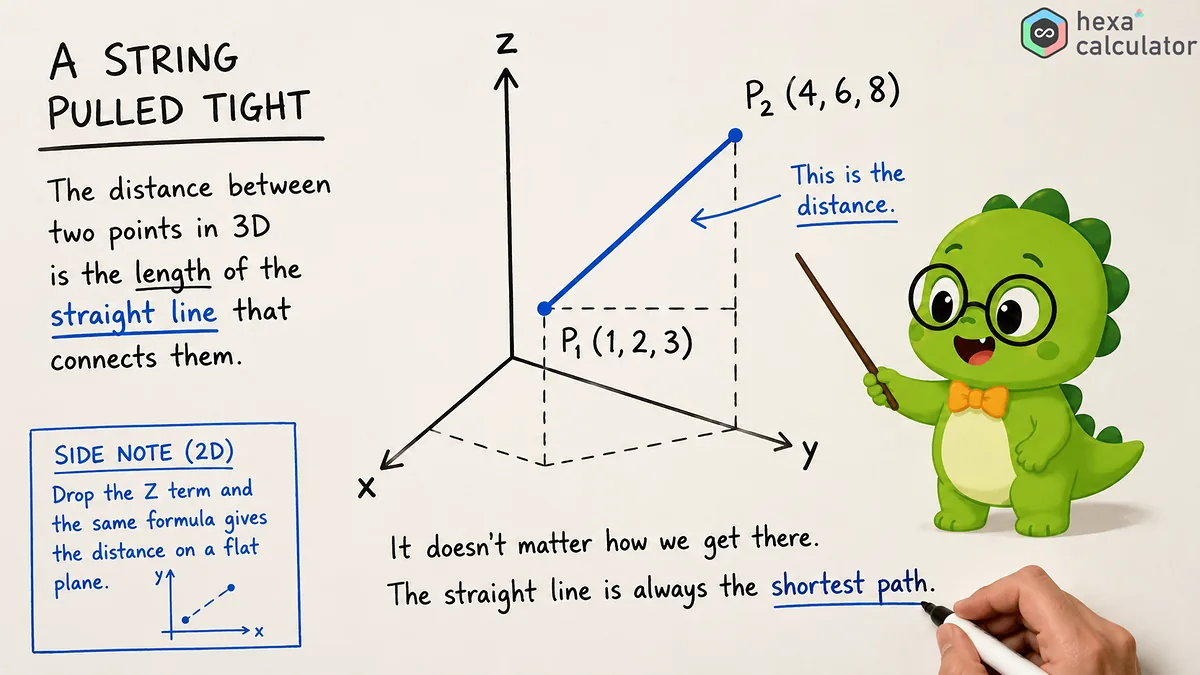
What is the formula for 3d distance?
The formula for the distance between two points in three-dimensional space is based on the Pythagorean theorem extended to include one more coordinate axis. It finds the difference of both points' coordinates for each axis, squares those values and adds them together before taking the square root.
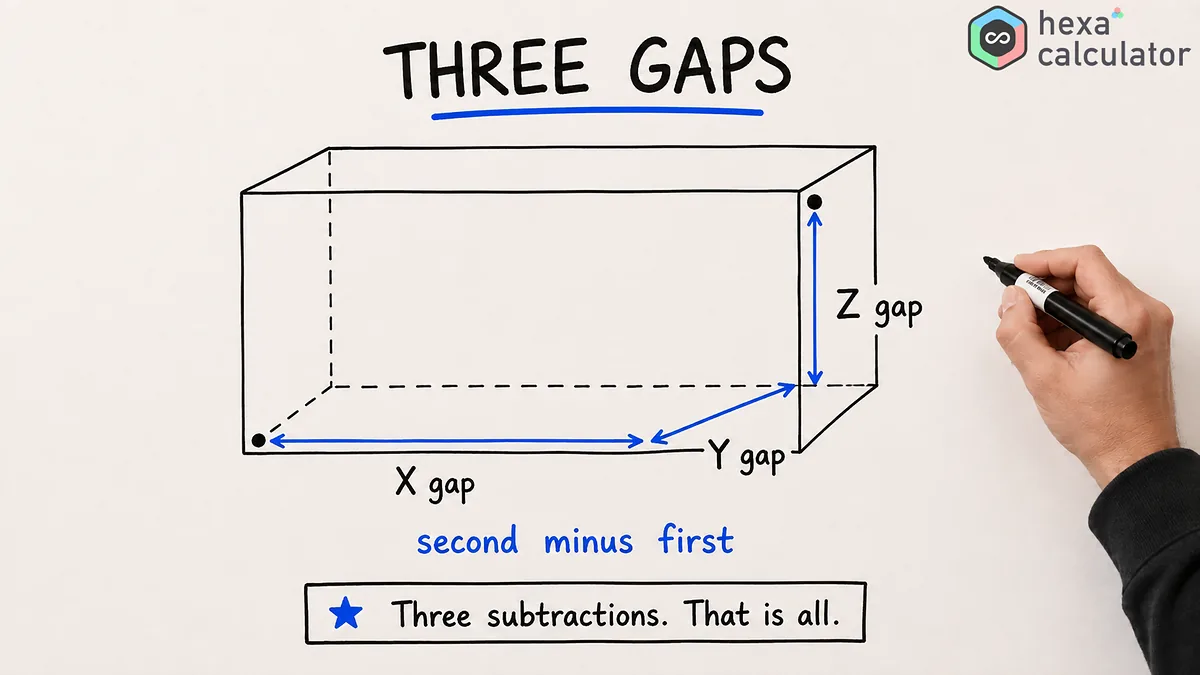
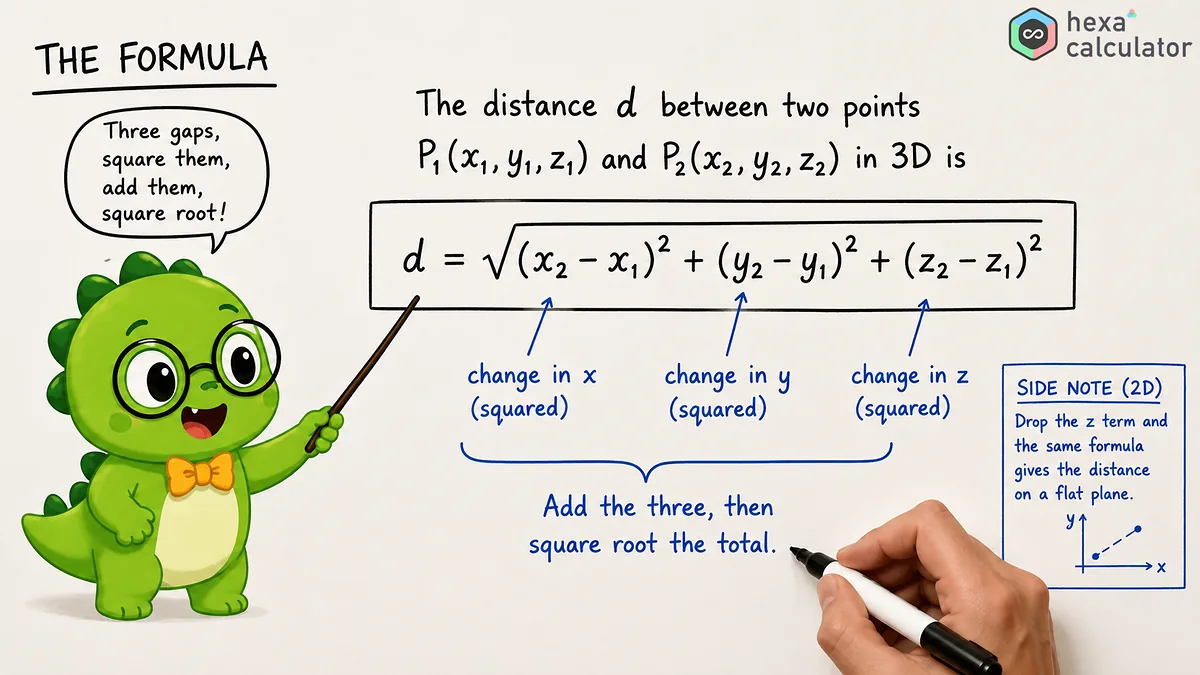
where 'd' is the distance, and (x1, y1, z1) are the coordinates of the first point, and (x2, y2, z2) are the coordinates of the second point. Since each difference is squared, the result can never be negative, so the direction doesn't matter. The distance from point 1 to point 2 is the same as the distance from point 2 back to point 1.
Here's how to use this calculator:
Enter the X, Y and Z coordinates of the first point followed by the three coordinates of the second point. After you have entered both points, the calculator will show the distance as its main result and in an adjacent area it will display the difference between the coordinates on each axis as well as the square of the distance. If you activate the "midpoint" option, you can also see the coordinates of the point that is exactly halfway between the two points. If you only want to calculate the distance on a plane, deactivate the Z-axis so that the input field for the Z-coordinate will be hidden and you can calculate a 2-dimensional distance.
Example calculation:
Let the first point be (1, 2, 3) and the second point be (4, 6, 8). The differences along each of the three axes is 3, 4, and 5 respectively.
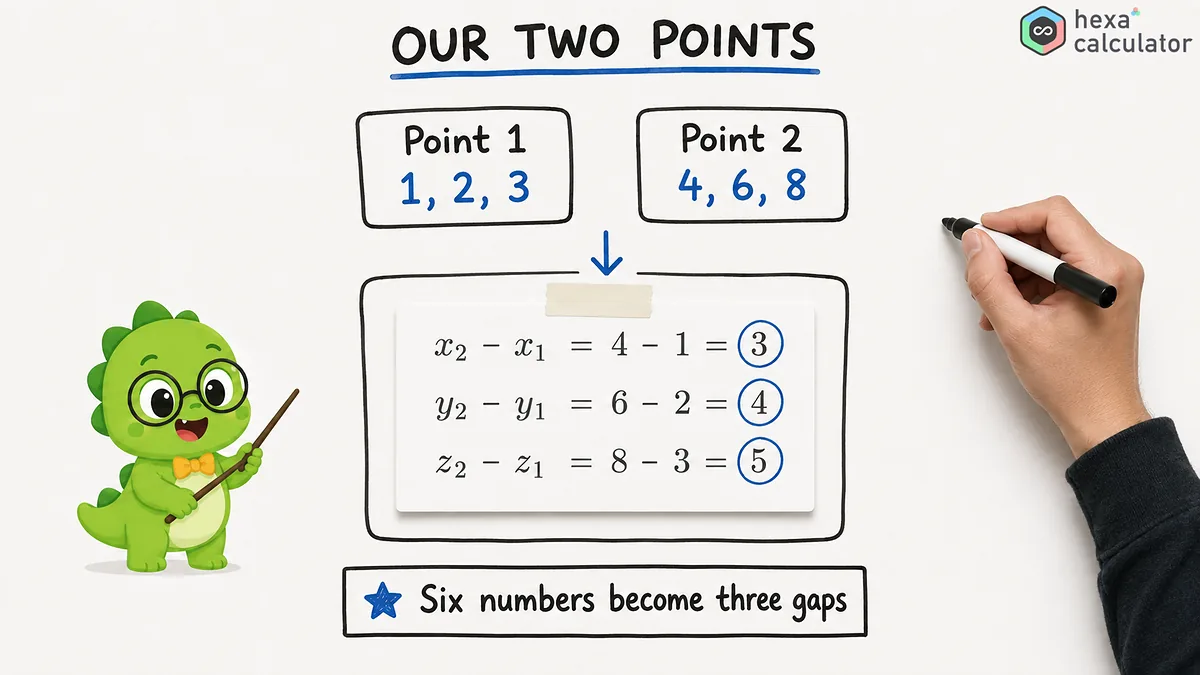
Squaring these values results in 9, 16, and 25, which add up to 50. Since the square root of 50 is approximately 7.07, the distance between the two points is approximately 7.07 units.
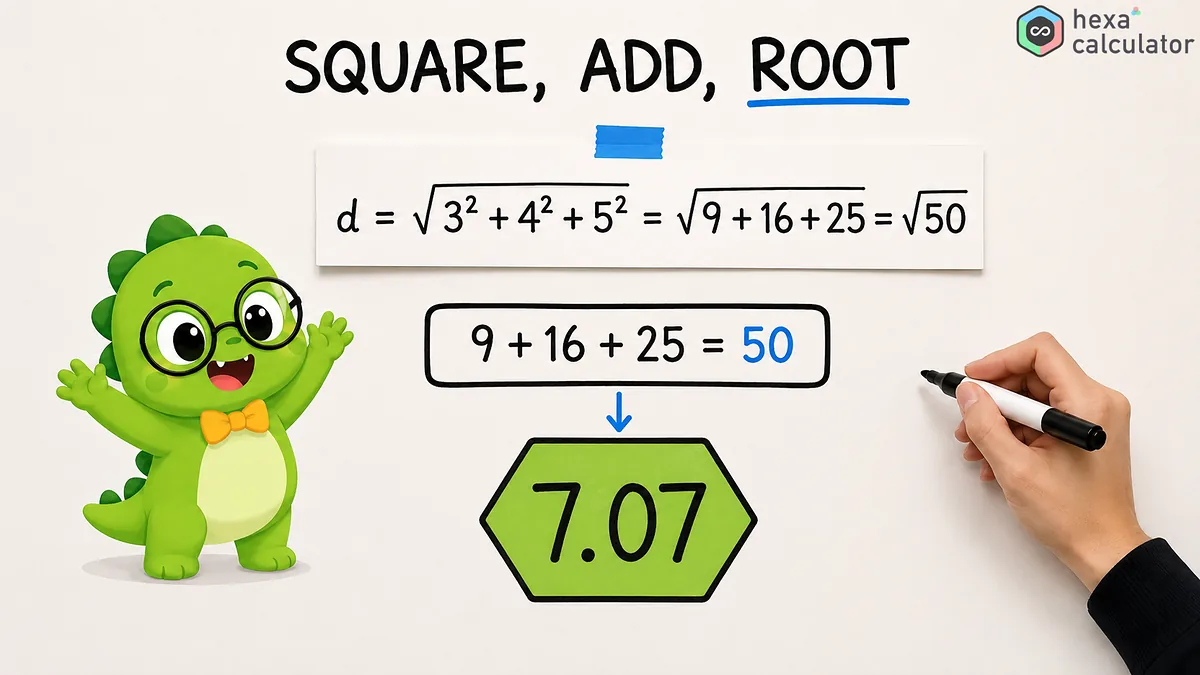
In this example the square of the distance 50 is the value inside the radical sign. In game engines and machine learning models it's common to compare the squares of distances directly. If all you care about is determining which point is closer, then computing the square root can be skipped to reduce computational load.
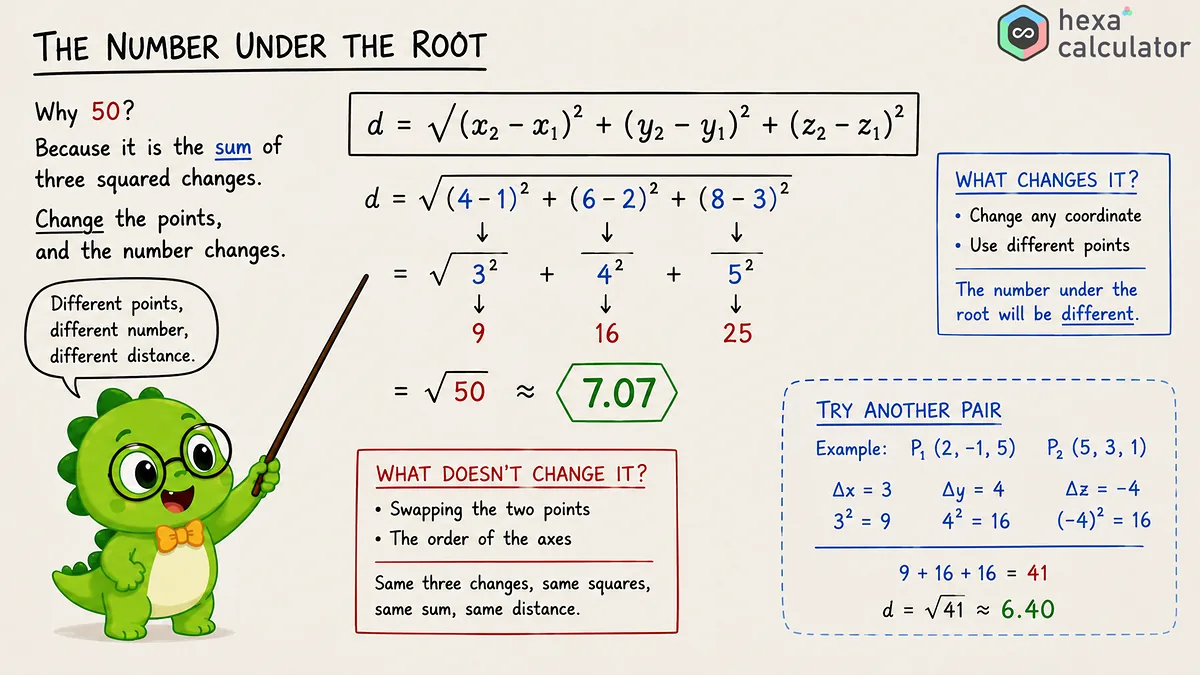
Switching from 3D distance to 2D distance:
The 2D distance is calculated the same way but without the term corresponding to the z-axis. If the two points have the same z-coordinate, this term will be zero and the formula simplifies to a formula for the distance in the plane.
If you use this function to disable the Z-axis, it will perform exactly that calculation. It treats the Z-coordinates of both points as being equal, and only measures the distance in the X-Y plane. Also, this formula explains why the distance between a point on the ground and the point directly above it is simply the difference in their heights.
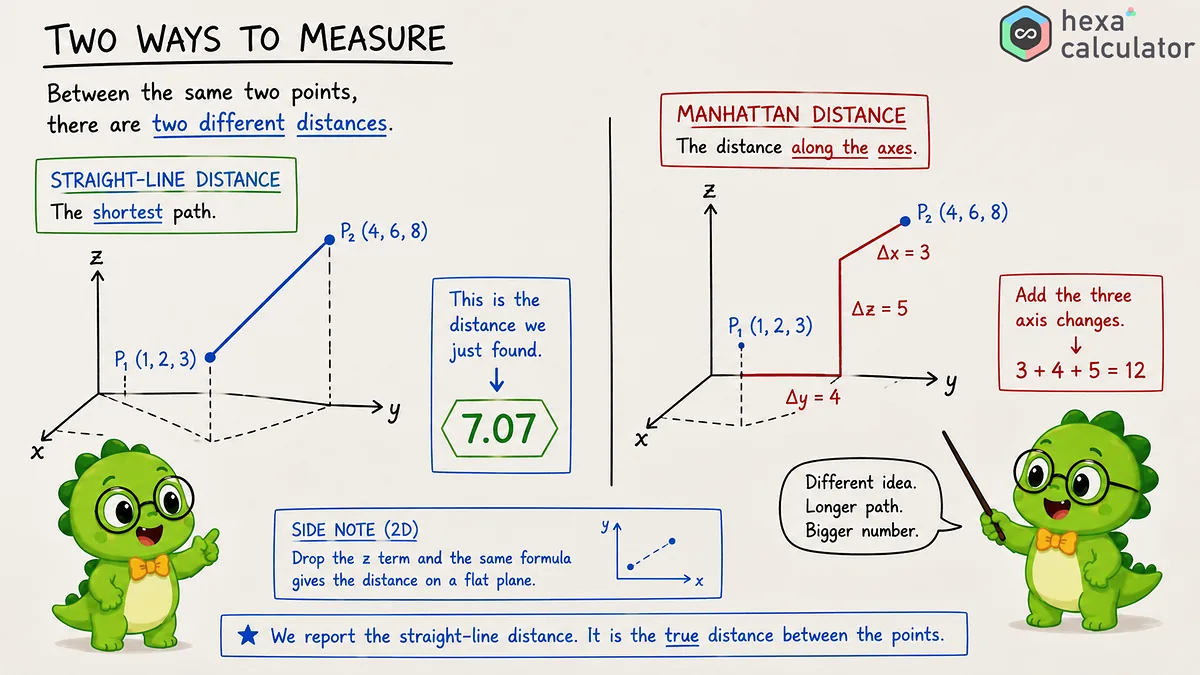
Other ways to measure include the Manhattan Distance, which is described in the image below, it is the distance along the axes.
Results that are shown in the calculation tool.
In the results area you can see not only the distance but also all of the elements that make up the calculation. The following table shows the names of each element.
Value | Meaning | How it is found |
|---|---|---|
X difference | Gap along the X axis | x2 minus x1 |
Y difference | Gap along the Y axis | y2 minus y1 |
Z difference | Gap along the Z axis | z2 minus z1 |
Distance squared | The value under the square root | Sum of the three squared differences |
Midpoint | The point halfway between | Average of the two points on each axis |
Other calculation examples:
The following are some coordinates and their distances to two decimal places. The second line is a typical example. The last line has the z coordinate not changing so it is actually calculating a 2d distance.
First point | Second point | Distance |
|---|---|---|
(0, 0, 0) | (1, 2, 2) | 3.00 |
(1, 1, 1) | (3, 6, 9) | 9.64 |
(-5, 2, -3) | (1, -4, 7) | 13.11 |
(2, 3, 5) | (7, 9, 5) | 7.81 |
The distance from the origin point (0, 0, 0) to a point is a special case worth memorizing. If you think of this point as a vector, then the distance corresponds to the length of the vector, or its norm. The distance from the point (1, 2, 2) to the origin is 3, so the length of the corresponding vector is also 3.
Application examples for the 3D distance.
Game engines often use this calculation. When determining whether a player is close enough to a checkpoint, an enemy, or a collectible item, the Euclidean distance is calculated internally in some way. To save the computational expense of calculating the square root, the squared distance is often used directly. In physics it is used to determine displacements in space and in robotics planning it is used to determine the path that a robotic arm must take. In machine learning it is a measure of how close two features are together and forms the basis for algorithms such as k-Nearest Neighbors and k-means clustering. GPS treats altitude as an additional axis so both the ground distance on the surface of the earth and the sloped distance taking into account elevation differences can be calculated with the same formula.
Differences between Euclidean distance and other distances:
The linear distance returned by this calculator is the Euclidean Distance which represents the shortest path between two points in space. It differs from the Manhattan Distance which calculates the sum of absolute differences along each axis without squaring them, and thus corresponds to the length a car would travel in a city block. While the Euclidean Distance between the points (1, 2, 3) and (4, 6, 8) is approximately 7.07, the Manhattan Distance is the sum of 3, 4, and 5 which equals 12. Many problems in geometry, physics, and computer graphics use Euclidean distance.
Important notes for correct results:
For two points you must use the same unit for each coordinate axis. This calculator does not convert units so using meters on one axis and feet on another will give meaningless results. You are free to mix negative numbers, positive numbers, and zero in your coordinates. If the coordinates of two points along a given axis are equal then that term drops out and the distance is determined only by the remaining axes.
Frequently asked questions
What is the formula for 3d distance?
The distance is calculated by squaring the differences of each coordinate axis and adding them together, then taking the square root of the result. This means that you add (x2 - x1)², (y2 - y1)², and (z2 - z1)², then take the square root. It is a formula which extends Pythagoras' theorem by one term for the Z-axis.
What is the distance between the points (1, 1, 1) and (3, 6, 9)?
About 9.64. The differences in the three coordinate axes are 2, 5 and 8. Squaring these gives 4, 25 and 64. The sum is 93, and the square root of 93 is about 9.64.
Can this calculator also calculate the 2D distance?
Yes. When the z-axis is disabled, the input field for the z-coordinate disappears and the standard 2D distance formula is used which only takes into account the x- and y-coordinates. Even if both of the z-coordinates of the two points are set to zero, the result will be the same.
Can negative coordinates be used?
Yes. Since squaring each difference eliminates the sign, points like (-5, 2, -3) can be calculated in exactly the same way as other points. Any combination of positive numbers, negative numbers, and zeroes is possible.
What is the difference between Euclidean distance and Manhattan distance?
The Euclidean distance is the shortest distance between two points along a straight line and is calculated by squaring the coordinate differences. The Manhattan distance sums the absolute values of each difference to determine the distance that would be required to move along a grid. This calculator returns the Euclidean distance, which is needed in many problems in geometry and physics.
Related calculators

Disclaimer: This calculator is provided for general informational and educational purposes only. Our calculators are under active development, and results may be inaccurate, incomplete, or unsuitable for your situation. Always verify the figures independently and seek advice from a qualified professional before relying on them. We make no warranties and accept no liability for any loss or decision arising from use of this tool.
References
- Wikipedia: Euclidean distance
The distance formula in two, three, and higher dimensions, with its link to vector length.
- Wikipedia: Distance
An overview of distance, including Euclidean and other metrics.
- Math is Fun: Distance Between 2 Points
A plain-language walkthrough of the distance formula with worked examples.